Client side SQLite
In this example we're going to create an app that retrieves data from a SQLite database, handling the operation entirely on the client side. We're going to compile SQLite for WebAssembly and use it to query a downloaded copy of the database. It's a demonstration of Zigar's virtual file system, a feature introduced in version 0.14.2.
First, we'll create the project:
npm create vite@latest│
◇ Project name:
│ sqlite
│
◇ Select a framework:
│ React
│
◇ Select a variant:
│ JavaScript + SWC
│
◇ Use rolldown-vite (Experimental)?:
│ No
│
◇ Install with npm and start now?
│ No
│
◇ Scaffolding project in /home/rwiggum/sqlite...
│
└ Done. Now run:
cd sqlite
npm install
npm run dev
Go into the directory and install the necessary files:
cd sqlite
npm install
npm install --save-dev rollup-plugin-zigar
After that we install zig-sqlite, a Zig package that provides a wrapper around the SQLite C API. As there is currently no central repository for Zig packages, you'll need to obtain zig-sqlite from the source. Go to the project's Github page. Click on the branch/tag button at the upper-left-hand corner, and select "zig-0.14.0" in the down-drop menu:

Click on the green "Code" button on the right and copy the URL of the download link:

Now go back to the terminal, create the sub-directory zig, and cd to it:
mkdir zig
cd zig
Create an empty build.zig:
touch build.zigEnter "zig fetch --save " then paste the copied URL and press ENTER:
zig fetch --save https://github.com/vrischmann/zig-sqlite/archive/refs/heads/zig-0.14.0.zip
That'll fetch the package and create a build.zig.zon listing it as a dependency. The build.zig
in the directory only exists to keep zig fetch happy. It's ignored when empty. To add zig-sqlite
to the build we'll use build.extra.zig instead. Create a barebone one with the following command:
npx rollup-plugin-zigar extraThe file looks like this initially:
const std = @import("std");

pub fn getImports(b: *std.Build, args: anytype) []const std.Build.Module.Import {
    _ = b;
    _ = args;
    // args contains the following:
    //
    //     library: *std.Build.Step.Compile,
    //     target: std.Build.ResolvedTarget,
    //     optimize: std.builtin.OptimizeMode,
    return &.{};
}

pub fn getCSourceFiles(b: *std.Build, args: anytype) []const []const u8 {
    _ = b;
    _ = args;
    // args contains the following:
    //
    //     library: *std.Build.Step.Compile,
    //     module: *std.Build.Module,
    //     target: std.Build.ResolvedTarget,
    //     optimize: std.builtin.OptimizeMode,
    return &.{};
}

pub fn getIncludePaths(b: *std.Build, args: anytype) []const []const u8 {
    _ = b;
    _ = args;
    // args contains the following:
    //
    //     library: *std.Build.Step.Compile,
    //     module: *std.Build.Module,
    //     target: std.Build.ResolvedTarget,
    //     optimize: std.builtin.OptimizeMode,
    return &.{};
}
As their names suggest, getImports is for adding imports while getCSourceFiles and
getIncludePaths are for adding C code. These functions get inlined into Zigar's build file during
the build process.
Delete the last two functions and add zig-sqlite into the list of imports:
const std = @import("std");

pub fn getImports(b: *std.Build, args: anytype) []const std.Build.Module.Import {
    const sqlite = b.dependency("sqlite", .{
        .target = args.target,
        .optimize = args.optimize,
    });
    return &.{
        .{ .name = "sqlite", .module = sqlite.module("sqlite") },
    };
}
Then create sqlite.zig in the same directory:
const std = @import("std");
const wasm_allocator = std.heap.wasm_allocator;

const sqlite = @import("sqlite");

var database: ?*sqlite.Db = null;

pub fn openDb(path: [:0]const u8) !void {
    if (database != null) closeDb();
    const db = try wasm_allocator.create(sqlite.Db);
    errdefer wasm_allocator.destroy(db);
    db.* = try sqlite.Db.init(.{
        .mode = .{ .File = path },
        .open_flags = .{},
        .threading_mode = .SingleThread,
    });
    database = db;
}

pub fn closeDb() void {
    if (database) |db| {
        db.deinit();
        wasm_allocator.destroy(db);
        database = null;
    }
}
So we start out with two functions that opens and closes a database. We'll add more once we verify that the SQLite is correctly linked in.
Open src/App.jsx and import these functions:
import { useState } from 'react'
import { closeDb, openDb } from '../zig/sqlite.zig'
And change the onClick handler of the button:
        <button onClick={() => {
          openDb('/db.sqlite3')
          closeDb()
        }}>
Before we can build we need to add rollup-plugin-zigar to the vite.config.js:
import react from '@vitejs/plugin-react-swc'
import zigar from 'rollup-plugin-zigar'
import { defineConfig } from 'vite'

// https://vite.dev/config/
export default defineConfig({
  plugins: [
    react(),
    zigar({ optimize: 'ReleaseSmall' }),
  ],
})
We hardcode the optimization setting to ReleaseSmall here because SQLite wouldn't build in debug
mode. One of its functions apparently has too many local variables for WebAssembly to handle.
At this point we're ready. Start up Vite in dev mode in a terminal window:
npm run devWhen you open the link, the page might remain blank for a while as SQLite is compiled. Once that's done, click on the button. Nothing will happen.
Hit Ctrl-Shift-J to open the development console. You should see the following errors:
▸ WASI method 'path_filestat_get' requires the handling of the 'stat/open' event
▸ Uncaught Error: SQLite cant open
    at onClick (App.jsx:24:11)
Okay, so SQLite appears to be running. We see that it's trying get the file's stats. The error is expected since we haven't set up the virtual file system yet.
Let us first get a sample SQLite file. We'll use the sample database provided by sqlitetutorial.net:
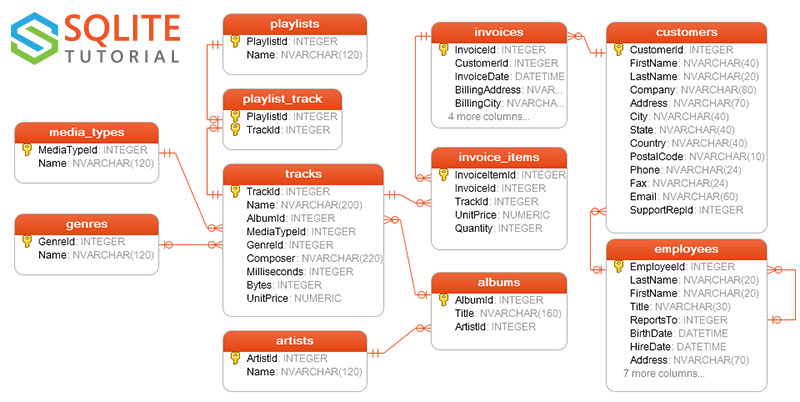
Download chinook.zip
and unzip the file into src/assets.
Open vite.config.js and add *.db to
assetsInclude:
import react from '@vitejs/plugin-react-swc'
import zigar from 'rollup-plugin-zigar'
import { defineConfig } from 'vite'

export default defineConfig({
  plugins: [
    react(),
    zigar({ optimize: 'ReleaseSmall' }),
  ],
  assetsInclude: [ '**/*.db' ],
})
Return to src/App.jsx and import chinook.db:
import chinook from './assets/chinook.db'And fetch its content in the global scope:
const resp = await fetch(chinook)
const data = await resp.bytes()
console.log({ data })
After verifying that we have the data, we add a listener for the Zigar event open. We do this
through the special export object __zigar:
import { __zigar, closeDb, openDb } from '../zig/sqlite.zig'__zigar.on('open', (evt) => {
console.log(evt)
if (evt.path.endsWith('.sqlite3')) {
return data
}
})Now when you click the button, you see two event objects appearing in the console. The first is the result of a file stat operation:
{
    "parent": null,
    "path": "db.sqlite3",
    "rights": {},
    "flags": {
        "dryrun": true
    }
}
The second is the actual open operation:
{
    "parent": null,
    "path": "db.sqlite3",
    "rights": {
        "read": true,
        "readdir": true
    },
    "flags": {}
}
The path is relative to the parent directory, which is null here since the file sits in the root
directory.
As we're no longer encountering errors, we'll start adding functions that query the database.
First, an album search by title. Add the following variables to sqlite.zig:
const album_search_sql =
    \\SELECT a.AlbumId, a.Title, b.ArtistId, b.Name AS Artist
    \\FROM albums a
    \\INNER JOIN artists b ON a.ArtistId = b.ArtistId
    \\WHERE a.Title LIKE '%' || ? || '%'
    \\ORDER BY a.Title
;
var album_search_stmt: sqlite.StatementType(.{}, album_search_sql) = undefined;
In openDb(), initialize the prepared statement:
    errdefer db.deinit();
    album_search_stmt = try db.prepare(album_search_sql);
And deinitialize it in closeDb():
album_search_stmt.deinit();Define a struct for holding the content of each row:
const Album = struct {
    AlbumId: u32,
    Title: []const u8,
    ArtistId: u32,
    Artist: []const u8,
};
And add a function that executes the prepare statement:
pub fn findAlbums(allocator: std.mem.Allocator, keyword: []const u8) ![]Album {
    defer album_search_stmt.reset();
    return try album_search_stmt.all(Album, allocator, .{}, .{keyword});
}
Import this function in src/App.jsx and call it in the onClick handler:
          openDb('/db.sqlite3')
          const albums = findAlbums('rock')
          for (const album of albums) {
            console.log(album)
          }
          closeDb()
A button press now produces the following error:
▸ WASI method 'path_create_directory' requires the handling of the 'mkdir' event
WTF? Why would a database search trigger the creation of a directory? Let's check what SQLite is trying to create:
__zigar.on('mkdir', (evt) => {
  console.log(evt)
})
We get the following output:
{
    "parent": null,
    "path": "db.sqlite3.lock"
}
Ah ha! SQLite is using the directory as a locking mechanism. Since our database "file" cannot be accessed concurrently, we're just going to pretend the operation succeeded:
__zigar.on('mkdir', () => true)
__zigar.on('rmdir', () => true)
After the change, the search now seems to work but there're still error messages triggered by
SQLite looking for non-existing files like db.sqlite3-journal and db.sqlite3-wal. We fix
them by making our open listener return false instead of undefined:
__zigar.on('open', (evt) => {
  if (evt.path.endsWith('.sqlite3')) {
    return data
  } else {
    return false
  }
})By default, Zig functions return Zig objects, which are DataViews wrapped by JavaScript classes.
They're somewhat cumbersome to work with on the JavaScript side. String fields are especially
annoying since you need to specifically access a []const u8's string property to avoid
receiving an array of bytes.
Zigar provides a mechanism that lets you mark specific fields and declarations as string or plain. The following makes all fields that can be string strings and all functions return plain JavaScript objects:
pub const @"meta(zigar)" = struct {
    pub fn isFieldString(comptime T: type, comptime _: std.meta.FieldEnum(T)) bool {
        return true;
    }

    pub fn isDeclPlain(comptime T: type, comptime _: std.meta.DeclEnum(T)) bool {
        return true;
    }
};
Adding the snippet above to sqlite.zig makes the results from findAlbums() a lot friendlier on
the front-end. It now returns a regular JavaScript array holding regular objects:
{
    "AlbumId": 59,
    "Title": "Deep Purple In Rock",
    "ArtistId": 58,
    "Artist": "Deep Purple"
}
{
    "AlbumId": 1,
    "Title": "For Those About To Rock We Salute You",
    "ArtistId": 1,
    "Artist": "AC/DC"
}Let us add another function, one that retrieves the tracks of a given album. The idea is basically the same. We have a SQL query and corresponding prepared statement:
const track_retrieval_sql =
    \\SELECT a.TrackId, a.Name, a.Milliseconds, b.GenreId, b.Name as Genre
    \\FROM tracks a
    \\INNER JOIN genres b ON a.GenreId = b.GenreId
    \\WHERE a.AlbumId = ?
    \\ORDER BY a.TrackId
;
var track_retrieval_stmt: sqlite.StatementType(.{}, track_retrieval_sql) = undefined;
We prepare the statement in openDb():
    album_search_stmt = try db.prepare(album_search_sql);
    errdefer album_search_stmt.deinit();
    track_retrieval_stmt = try db.prepare(track_retrieval_sql);
    errdefer track_retrieval_stmt.deinit();
And free it in closeDb():
track_retrieval_stmt.deinit();We define a struct for the row produced by the query:
const Track = struct {
    TrackId: u32,
    Name: []const u8,
    Milliseconds: u32,
    GenreId: u32,
    Genre: []const u8,
};
And a function that executes the prepared statement:
pub fn getTracks(allocator: std.mem.Allocator, track_id: u32) ![]Track {
    defer track_retrieval_stmt.reset();
    return try track_retrieval_stmt.all(Track, allocator, .{}, .{track_id});
}
In our onClick handler, we verify that the function works:
          const albums = findAlbums('rock')
          for (const album of albums) {
            console.log(album)
            const tracks = getTracks(album.AlbumId)
            console.log(tracks)
}With our "back-end" functions working, we can proceed to build a proper front-end. Since this isn't a React tutorial, I'm simply going to give you the code without explanation.
Here's App.jsx:
import { useCallback, useDeferredValue, useEffect, useState } from 'react'
import { __zigar, findAlbums, getTracks, openDb } from '../zig/sqlite.zig'
import './App.css'
import chinook from './assets/chinook.db'

let data
const dataPromise = (async () => {
  const resp = await fetch(chinook)
  data = await resp.bytes()
  openDb('/db.sqlite3')
})()

__zigar.on('open', (evt) => {
  if (evt.path.endsWith('.sqlite3')) {
    return data
  } else {
    return false
  }
})
__zigar.on('mkdir', () => true)
__zigar.on('rmdir', () => true)

function App() {
  const [ ready, setReady ] = useState(() => {
    dataPromise.then(() => setReady(true))
    return false
  })
  const [ albums, setAlbums ] = useState([])
  const [ tracks, setTracks ] = useState([])
  const [ searchString, setSearchString ] = useState('')
  const [ selectedAlbumId, setSelectedAlbumId ] = useState()
  const deferredSearchString = useDeferredValue(searchString)
  const

  const onSearchChange = useCallback((evt) => {
    setSearchString(evt.target.value)
  }, [])
  const onAlbumClick = useCallback((evt) => {
    if (evt.target.tagName === 'LI') {
      setSelectedAlbumId(parseInt(evt.target.dataset.albumId))
    }
  }, [])
  useEffect(() => {
    const albums = (ready) ? findAlbums(deferredSearchString || '%') : []
    setAlbums(albums)
  }, [ ready, deferredSearchString ])
  useEffect(() => {
    const tracks = (selectedAlbumId) ? getTracks(selectedAlbumId) : []
    setTracks(tracks)
  }, [ selectedAlbumId ])
  useEffect(() => {
    if (selectedAlbumId) {
      if (!albums.find(a => a.AlbumId === selectedAlbumId)) {
        setSelectedAlbumId(undefined)
      }
    }
  }, [ albums ])
  return (
    <>
      <div id="header">
        <input id="search" value={searchString} onChange={onSearchChange} disabled={!ready} />
      </div>
      <div id="content">
        <ul id="album-list" onClick={onAlbumClick}>
          {albums.map(album =>
            <li
              key={album.AlbumId}
              className={album.AlbumId === selectedAlbumId ? 'selected' : ''}
              data-album-id={album.AlbumId}
              title={album.Artist}
            >
              {album.Title}
            </li>
          )}
        </ul>
        <ul id="track-list">
          {
            tracks.map(track =>
              <li
                key={track.TrackId}
                data-track-id={track.TrackId}
              >
                [{formatTime(track.Milliseconds)}] {track.Name}
              </li>
            )
          }
        </ul>
      </div>
    </>
  )
}

function formatTime(ms) {
  const min = Math.floor(ms / 60000).toString()
  let sec = Math.floor((ms % 60000) / 1000).toString()
  if (sec.length == 1) {
    sec = '0' + sec
  }
  return `${min}:${sec}`
}

export default App
And App.css:
body {
  display: flex;
  align-items: center;
  justify-content: center;
  overflow: hidden;
  color: white;
  background-color: black;
  user-select: none;
}

#root {
  display: flex;
  flex-direction: column;
  width: 100vw;
  height: 100vh;
}

#header {
  flex: 0 0 auto;
  display: flex;
  flex-direction: row;
  padding: .5em .5em .5em 1em;
}

#content {
  flex: 1 1 auto;
  display: flex;
  flex-direction: row;
  overflow: hidden;
}

#search {
  flex: 1 1 50%;
  display: block;
}

#toolbar {
  flex: 1 1 50%;
  display: flex;
  flex-direction: row;
  justify-content: end;
}

#album-list {
  flex: 1 1 50%;
  overflow: auto;
  height: 100%;
  margin-left: 0;
  padding-left: 1em;
  list-style:none;
}

#album-list LI {
  cursor: pointer;
  padding-left: 2px;
}

#album-list LI.selected {
  color: #000000;
  background-color: #FFFFAA;
}

#track-list {
  flex: 1 1 50%;
  overflow: auto;
  padding-left: 1em;
  list-style:none;
}
And the end result looks like this:

It's not fancy by any mean but it works lightning fast.
In the demo we only have two SQL queries. A real app would likely have dozens of them. Manually writing code for initialization of each prepared statement would get tiresome real fast. What we can do instead is store all our SQL queries in an anonymous struct:
const sql = .{
    .album_search =
    \\SELECT a.AlbumId, a.Title, b.ArtistId, b.Name AS Artist
    \\FROM albums a
    \\INNER JOIN artists b ON a.ArtistId = b.ArtistId
    \\WHERE a.Title LIKE '%' || ? || '%'
    \\ORDER BY a.Title
    ,
    .track_retrieval =
    \\SELECT a.TrackId, a.Name, a.Milliseconds, b.GenreId, b.Name as Genre
    \\FROM tracks a
    \\INNER JOIN genres b ON a.GenreId = b.GenreId
    \\WHERE a.AlbumId = ?
    \\ORDER BY a.TrackId
    ,
};
Then define a struct at comptime that has the corresponding prepared statements under the same field names:
var stmt: define: {
    const sql_fields = std.meta.fields(@TypeOf(sql));
    var fields: [sql_fields.len]std.builtin.Type.StructField = undefined;
    for (sql_fields, 0..) |sql_field, i| {
        const T = sqlite.StatementType(.{}, @field(sql, sql_field.name));
        fields[i] = .{
            .name = sql_field.name,
            .type = T,
            .default_value_ptr = null,
            .is_comptime = false,
            .alignment = @alignOf(T),
        };
    }
    break :define @Type(.{
        .@"struct" = .{
            .layout = .auto,
            .fields = &fields,
            .decls = &.{},
            .is_tuple = false,
        },
    });
} = undefined;
In openDb(), we initialize them like so:
    var initialized: usize = 0;
    errdefer {
        inline for (std.meta.fields(@TypeOf(sql)), 0..) |field, i| {
            if (i < initialized) @field(stmt, field.name).deinit();
        }
    }
    inline for (std.meta.fields(@TypeOf(sql))) |field| {
        @field(stmt, field.name) = try db.prepare(@field(sql, field.name));
        initialized += 1;
    }
And in closeDb(), we deinitialize them:
        inline for (std.meta.fields(@TypeOf(sql))) |field| {
            @field(stmt, field.name).deinit();
}The content of a SQLite database file is highly compressible. The .db file extension aren't
widely recognized though. While we can always configure a web server to compress such files, a much
simpler solution is to change the extension to .txt. It doesn't matter that it's inaccurate since
we're retrieving the file as binary.
Switching the extension enables compression automatically everywhere. For example, here's the output from the Vite build command:
dist/index.html                     0.45 kB │ gzip:   0.29 kB
dist/assets/sqlite-J83Iu82s.wasm  703.11 kB │ gzip: 306.35 kB
dist/assets/chinook-DRb10MF1.txt  884.74 kB │ gzip: 337.18 kB
dist/assets/index-BjijrQbJ.css      1.66 kB │ gzip:   0.72 kB
dist/assets/index-CZ-DMkex.js     362.45 kB │ gzip: 105.80 kB
We can see that the size of our web app is under 1 MB, which is quite reasonable in this day and age.
We also don't need to set assetsInclude in vite.config.js as Vite considers a .txt file
an asset by default.
You can see the web app in action
here. The live site does employ the .txt
trick. If you examine the network traffic, you'd see that Cloudflare's server managed to squeeze
the database file down to 282 KB using Brotli.
You can find the complete source code for this example here.
A client-side database offers some distinct advantages. Hosting cost is decisively lower--zero, if you go with the free tier offered by many vendors. There're no scaling issues to worry about, no weak point for hackers to get through. It can be a compelling solution for something like a business website, where the product catelog is small.
In a follow up exercise, we're going to investigate the possibility of emulating a file using HTTP partial requests. Instead of downloading the whole file at once, we'd fetch portions of it as SQLite requests them. This would make it practical to access much larger databases from the client side.