
GitHub App for reg-suit.
- frontend: https://reg-viz.github.io/gh-app/
Clone this repo and
$ yarn --pure-lockfile
$ yarn bootstrapYou need private-key for the App.
You have 2 options to get .pem file.
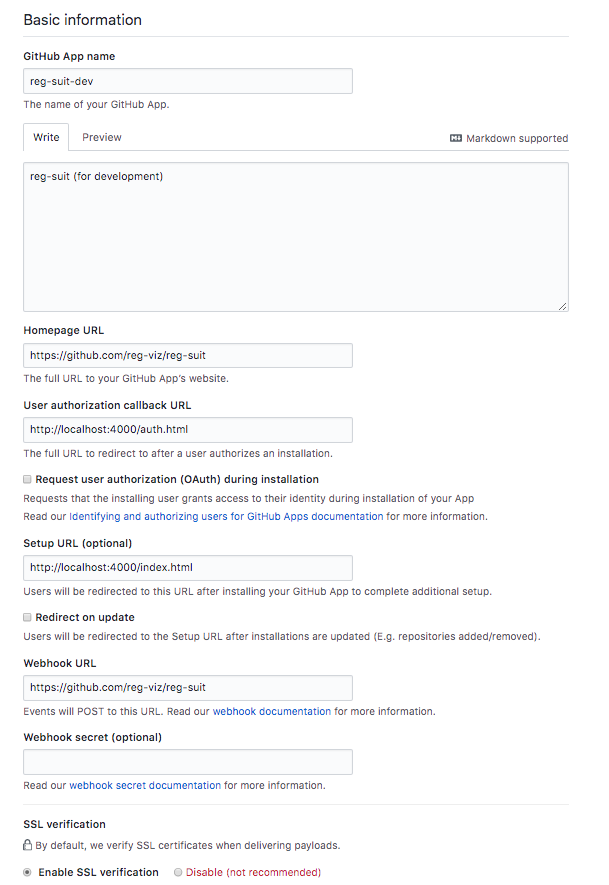
Go to https://github.com/settings/apps/new . And create your GitHub app so download a .pem file via "Generate a private key" button. When downloading successfully, copy the .pem file under this repository (.pem files are configured to be ignored via .gitignore).
The following figure is an example of GitHub App configurations:
If you're a member of reg-viz, I'll generate .pem file. Please contact me.
When you accept .pem file, put it under this repository.
$ cp .env.example .envAnd edit .env file.
GH_APP_ID: GitHub App id. You can get this value with your GitHub App setting page (eg: https://github.com/organizations/reg-viz/settings/apps/reg-suit-dev )GH_APP_CLIENT_ID: GitHub App client id. You can get this value with your GitHub App setting page (eg: https://github.com/organizations/reg-viz/settings/apps/reg-suit-dev )GH_APP_CLIENT_SECRET: GitHub App client secret. You can get this value with your GitHub App setting page (eg: https://github.com/organizations/reg-viz/settings/apps/reg-suit-dev )GH_APP_PEM_ENCODED: Executing./tools/pem-zip.js <your-pem-file>and paste the output.
$ cd packages/backend
$ yarn startThe following cURL command comments to this PR.
curl -X POST \
  http://localhost:3000/api/comment-to-pr \
  -H 'Content-Type: application/json' \
  -d '{
	"installationId": "1454831",
	"owner": "reg-viz",
	"repository": "gh-app",
	"branchName": "pr-comment-test",
	"failedItemsCount": 0,
	"newItemsCount": 0,
	"deletedItemsCount": 0,
	"passedItemsCount": 1
}'$ cd packages/frontend
$ yarn start$ open http://localshot:4000$ cd packages/frontend
$ yarn storybookMIT